Studio APIs
Overview
Studio APIs in the Self-Serve Portal (SSP) extend existing Signzy APIs with additional Orchestrational, Security and Data transformation features.
Think of Studio APIs as wrappers around base APIs:
- They preserve the business logic and documentation of the original APIs.
- They add plugins that transform how requests and responses are exchanged.
- They allow customization for advanced security, compliance, and data handling.
Studio APIs = Base API + Plugin(s)
Available Plugins
- Base64 Encode/Decode: Automatically encode or decode fields in the API request or response bodies using Base64.
- Example: Convert image file URL inputs to base64 before sending to Signzy APIs.
- Asymmetric Encryption:
- Algorithm: RSA2048-SHA256 (PKCS#8)
- Encrypt sensitive API input and output data using a public/private key pair.
- Ideal for compliance with strict data privacy regulations.
- Symmetric Encryption:
- Algorithm: AES-256-GCM
- Use a shared secret key to encrypt entire payloads for performance-focused secure data transfers.
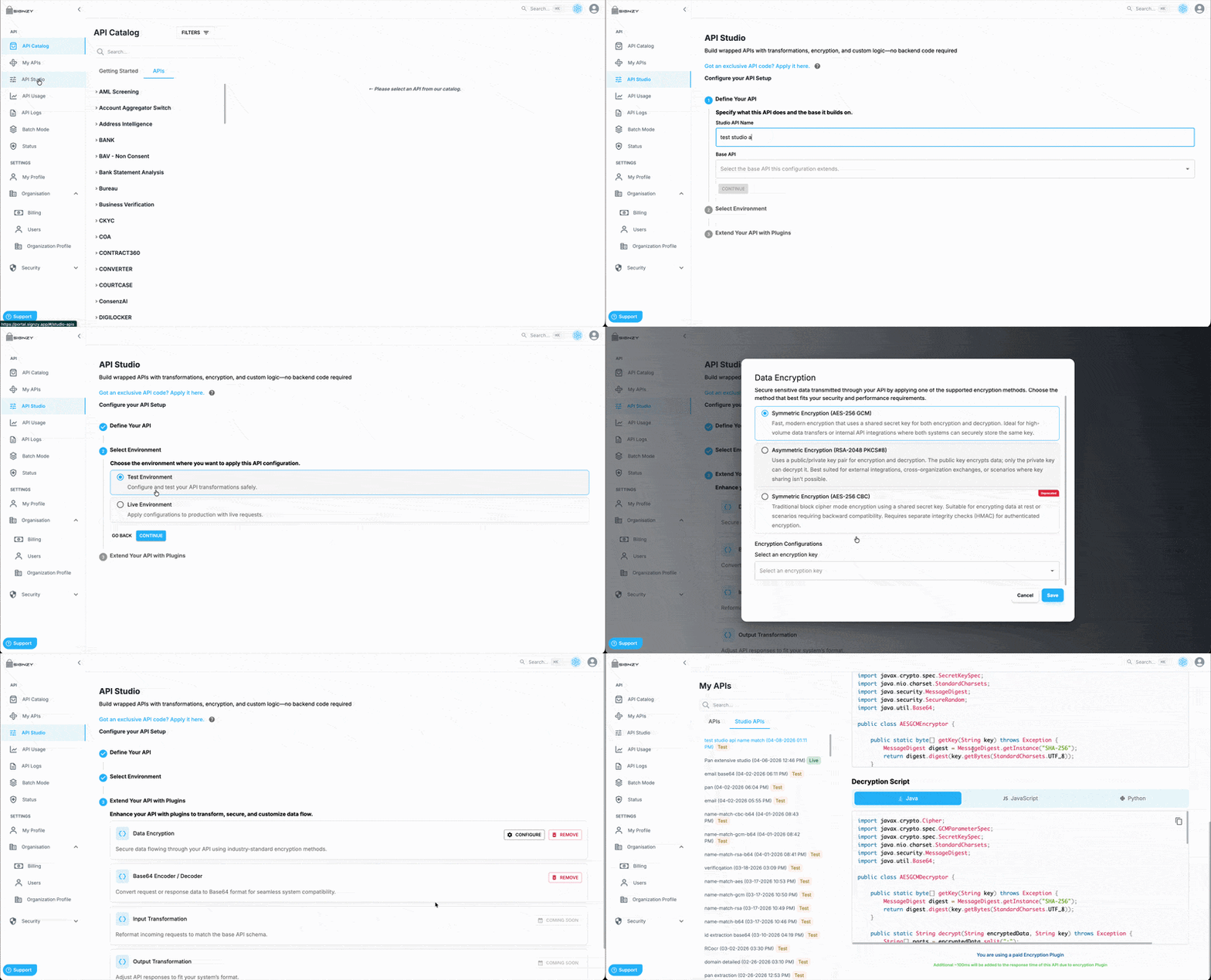
Create a Studio API
Studio APIs allow you to wrap existing APIs with additional capabilities such as encryption and encoding, enabling secure and flexible integrations.
Steps
- Navigate to API Studio
- Open the API Studio page from the dashboard.
- Configure API Setup
- Enter a Studio API Name.
- Select a Base API from the dropdown.
- Click Continue.
- Select Environment
- Choose the environment:
- Test
- Live
- Add Plugins
- Select required plugins:
- Data Encryption
- Base64 Encoder/Decoder
- Note: Input and output transformation plugins will be available soon.
- Create and Use API
- The Studio API is generated upon completion.
- Copy the cURL request from the interface.
- Retrieve the API Key from the API Credentials section.
- Use these to integrate the API.
Important
- Ensure the selected Base API is accessible with the chosen API credentials.
- If the Base API is not authorized for the credentials, the Studio API will not function.
Security Best Practices
- Use HTTPS in all API requests.
- Never log plaintext requests/responses.
Performance Considerations
- Symmetric AES: Minimal latency.
- Asymmetric RSA: Adds ~100ms latency.
- Base64: Increases payload size and may add latency, negligible processing cost.
Pricing & Notes
- Studio APIs are paid features; pricing depends on plugin usage.
- Each plugin adds processing overhead based on transformation type.