Document Intelligence
Introduction
Welcome to the Document Intelligence API, a comprehensive solution engineered to revolutionize your data processing and verification needs. This advanced tool utilizes cutting-edge machine learning and image analysis technologies, enabling efficient extraction of data from various identity documents, sophisticated ID classification, detailed image quality analysis, and precise face extraction where applicable.
The primary aim of this API is to enhance the operational workflow within your organization. By automating complex tasks such as data extraction, document verification, and compliance assurance, the Document Intelligence API allows for a substantial reduction in manual effort, heightened accuracy, and robust security.
Importantly, the broad versatility of this API makes it an invaluable asset across various industries, from banking, healthcare, and insurance to real estate and government services. By integrating our API, these sectors can witness a significant improvement in operational efficiency, risk management, and decision-making processes.
API Details
Endpoint
POST https://signzy.tech/api/v2/patrons/<patron-id>/documentIntelligencePOST https://preproduction.signzy.tech/api/v2/patrons/<patron-id>/documentIntelligenceRequest body parameters
Parameter | Data Type | Description | Required |
|---|---|---|---|
task | String | Defines the task we want to perform on this API. The value should be "idIntelligence". | Yes |
essentials | Object | Wrapper containing all the information required for processing to be done on identity documents. | yes |
essentials.frontUrl | String | The URL of the front image of the ID card. In case you have a multipage PDF document of your ID card then you can use frontURL to pass data to the API. | No |
essentials.backUrl | String | The URL of the back image of the ID card. | No |
essentials.country | String | The country where the ID card was issued. Check the complete list of supported countries here. | Yes |
essentials.idType | String | The type of ID card (e.g. Driving license, VISA, Passport, etc.). Check the complete list of supported documents here. | Yes |
essentials.performImageQualityAnalysis | Boolean | Indicates whether image quality analysis should be performed (default is true). | No |
essentials.performIdClassification | Boolean | Indicates whether ID card classification should be performed (default is true). | No |
essentials.performIdExtraction | Boolean | Indicates whether ID card data extraction should be performed (default is true). | No |
essentials.performFaceExtraction | Boolean | Indicates whether face extraction should be performed (default is true). | No |
essentials.imageQualityThreshold | Float | The preferred threshold for the image quality score (Between 0.05 and 0.95, the default is 0.5). | No |
Note: Either one of frontUrl or backURL needs to be passed while making the API call.
{
    "task": "idIntelligence",
    "essentials": {
        "frontUrl": "https://domain/....hotesd_image..../image.jpg",
        "backUrl": "",
        "country": "United States",
        "idType": "Passport",
        "performImageQualityAnalysis": true,
        "performIdClassification": true,
        "performIdExtraction": true,
        "performFaceExtraction": true,
        "imageQualityThreshold": 0.5
    }
}
Request headers
Name | Value | Required | Description |
|---|---|---|---|
Content-Type | application/json | Yes | The type of content that the request body contains. |
Authorization | XXXXXXXXXXX | Yes | An authentication token to authorize the request. Reach out to the Signzy support team to get one created. |
Code Samples
package main

import (
  "fmt"
  "strings"
  "net/http"
  "io/ioutil"
)

func main() {

  url := "https://preproduction.signzy.tech/api/v2/patrons/<patron-id>/documentIntelligence"
  method := "POST"

  payload := strings.NewReader(`{
    "task": "idIntelligence",
    "essentials": {
        "frontUrl": "https://domain/....hotesd_image..../image.jpg",
        "backUrl": "",
        "country": "United States",
        "idType": "Passport",
        "performImageQualityAnalysis": true,
        "performIdClassification": true,
        "performIdExtraction": true,
        "performFaceExtraction": true,
        "imageQualityThreshold": 0.5
    }
}`)

  client := &http.Client {
  }
  req, err := http.NewRequest(method, url, payload)

  if err != nil {
    fmt.Println(err)
    return
  }
  req.Header.Add("authorization", "{{access_token}}")
  req.Header.Add("Content-Type", "application/json")

  res, err := client.Do(req)
  if err != nil {
    fmt.Println(err)
    return
  }
  defer res.Body.Close()

  body, err := ioutil.ReadAll(res.Body)
  if err != nil {
    fmt.Println(err)
    return
  }
  fmt.Println(string(body))
}
Response body parameters
Parameter | Data type | Description |
|---|---|---|
essentials | Object | Same as the essentials object passed in the request body. |
result | Object | Contains the results after processing the ID document. |
result.results | Object | |
result.results.predictedIddTypeFront | String | Id classification of the front side of the ID card. In case you have passed a multipage PDF document(containing back and front in single file) of your ID card in the request then you will get the predicted ID type of document as part of this field. Note: For multipage PDFs ID classification/prediction might not work properly. |
result.results.predictedIddTypeBack | String | Id classification of the back side of the ID card. |
result.results.idExpired | String | Defines if the ID card is expired or not. "False" means the id card is not expired and "True" means it's expired. |
result.results.extractedFields | Object | Data extraction results from the ID document. |
result.results.extractedFields.firstName | String | The 'firstName' parameter represents the extracted first name of the individual as it appears on their identity document. |
result.results.extractedFields.lastName | String | The 'lastName' parameter represents the extracted last name of the individual as it appears on their identity document. |
result.results.extractedFields.names | String | |
result.results.extractedFields.address | String | The 'address' parameter denotes the extracted residential address of the individual as it appears on their identity document. |
result.results.extractedFields.number | String | The 'number' parameter represents the extracted unique identification number from the individual's identity document, such as a passport number, driver's license number, etc. |
result.results.extractedFields.DOB | String | The 'DOB' (Date of Birth) parameter refers to the individual's birth date extracted from the identity document. It is typically returned in the format of DD/MM/YYYY. |
result.results.extractedFields.issuingState | String | The 'issuingState' parameter signifies the state or the administrative division that issued the individual's identity document. |
result.results.extractedFields.expiryDate | String | The 'expiryDate' parameter refers to the date of expiration of the identity document, usually returned in the format of DD/MM/YYYY. |
result.results.extractedFields.nationality | String | The 'nationality' parameter refers to the country that issued the individual's identity document. |
result.results.extractedFields.gender | String | The 'gender' parameter denotes the gender of the individual as listed on their identity document. |
result.results.extractedFields.additionalData | Object | The 'additionalData' parameter includes any other information extracted from the identity document that does not fit into the previously defined extractedFields parameters. This could include various attributes depending on the specific identity document, such as profession, employer, etc. |
result.results.imageQualityFront | Object | This parameter contains the assessment results of the image quality for the front side of the document. Note: In case you are passing a multipage PDF in input then you won't get image quality analysis results as part of response. |
result.results.imageQualityFront.qualityScores | Object | This object contains the quality scores for several criteria including text quality, brightness, sharpness, and compression quality. Each criterion has two sub-fields: "valid" and "score". "valid" indicates whether the criterion is met ("yes") or not ("no"), and "score" is a numerical value representing the quality score for that criterion. |
result.results.imageQualityFront.qualityScores.textQuality | Object | This object contains the quality score of the text in the image. It includes two sub-fields: "valid" and "score". |
result.results.imageQualityFront.qualityScores.valid | String | The 'valid' field indicates whether the image quality threshold is above than the one defined in the request. A value of "yes" implies that the criterion is fulfilled, and "no" implies it is not. |
result.results.imageQualityFront.qualityScores.score | String | The 'score' field is a numerical value representing the quality score for that specific criterion. The score typically ranges between "0" (lowest quality) and "1.0" (highest quality). |
result.results.imageQualityFront.qualityScores.brightness | Object | This object contains the quality score related to the brightness of the image. It includes two sub-fields: "valid" and "score". |
result.results.imageQualityFront.qualityScores.sharpness | Object | This object contains the quality score related to the sharpness of the image. It includes two sub-fields: "valid" and "score". |
result.results.imageQualityFront.qualityScores.compressionQuality | Object | This object contains the quality score related to the compression quality of the image. It includes two sub-fields: "valid" and "score". |
result.results.imageQualityFront.score | String | This field represents the minimum of all the quality scores of the image. |
result.results.imageQualityFront.imageQuality | String | This field provides an overall qualitative assessment of the image quality, such as "high", "medium", or "low". |
result.results.imageQualityBack | Object | This parameter contains the assessment results of the image quality for the back side of the document. The nested properties are same as ones defined above for "imageQualityFront" Note: In case you are passing a multipage PDF in input then you won't get image quality analysis results as part of response. |
result.results.faceUrl | String | The 'faceURL' parameter represents the URL of the extracted face image from the individual's identity document. |
Note: In case you pass a multipage PDF as input in frontUrl, the ID classification might not work expected in some cases. Also the image quality analysis won't be done for multi page PDFs.
{
    "essentials": {
        "frontUrl": "",
        "backUrl": "",
        "country": "",
        "idType": "",
        "performImageQualityAnalysis": true/false,
        "performIdClassification": true/false,
        "performIdExtraction": true/false,
        "performFaceExtraction": true/false,
        "imageQualityThreshold": 0.5 (optional)
    },
    "id": "<Signzy generated ID>",
    "patronId": "<patron id>",
    "task": "idIntelligence",
    "result": {
        "faceUrl": "...url of cropped face from the Id document...",
        "imageQualityFront": {
            "qualityScores": {
                "textQuality": {
                    "valid": "yes/no",
                    "score": "...validity score..."
                },
                "sharpness": {
                    "valid": "yes/no",
                    "score": "...validity score..."
                },
                "brightness": {
                    "valid": "yes/no",
                    "score": "...validity score..."
                },
                "compressionQuality": {
                    "valid": "yes/no",
                    "score": "...validity score..."
                }
            },
            "score": "...total score...",
            "summary": "...summary...",
            "msg": "...msg...",
            "status": "...status...",
            "imageQuality": "...image quality..."
        },
        "imageQualityBack": {
            "qualityScores": {
                "textQuality": {
                    "valid": "yes/no",
                    "score": "...validity score..."
                },
                "sharpness": {
                    "valid": "yes/no",
                    "score": "...validity score..."
                },
                "brightness": {
                    "valid": "yes/no",
                    "score": "...validity score..."
                },
                "compressionQuality": {
                    "valid": "yes/no",
                    "score": "...validity score..."
                }
            },
            "score": "...total score...",
            "summary": "...summary...",
            "msg": "...msg...",
            "status": "...status...",
            "imageQuality": "...image quality..."
        },
        "predictedIdTypeFront": "...predicted id type...",
        "predictedIdTypeBack": "...predicted id type...",
        "idExpired": "True/False",
        "extractedFields": {
            "firstName": "",
            "lastName": "",
            "names": "",
            "address": "",
            "number": "",
            "DOB": "",
            "issuingState": "",
            "expiryDate": "",
            "nationality": "",
            "gender": "",
            "additionalData": {
                // Will vary depending upon data that can be extracted from ID cards
            }
        }
    }
}
Image quality requirements
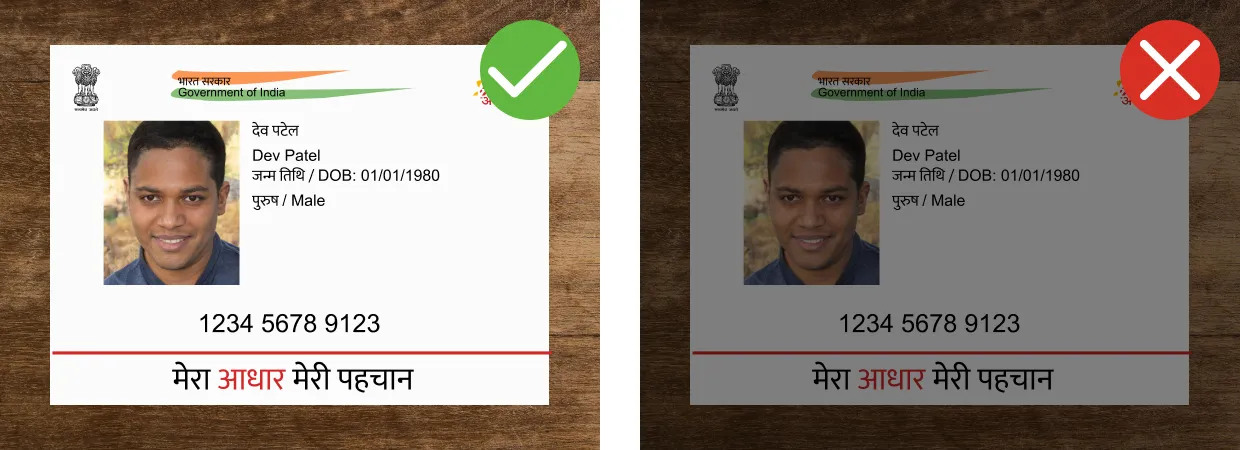
Good lighting
Good lighting helps to achieve better OCR results. If the image is too dark or too bright, the document might not be processed successfully.
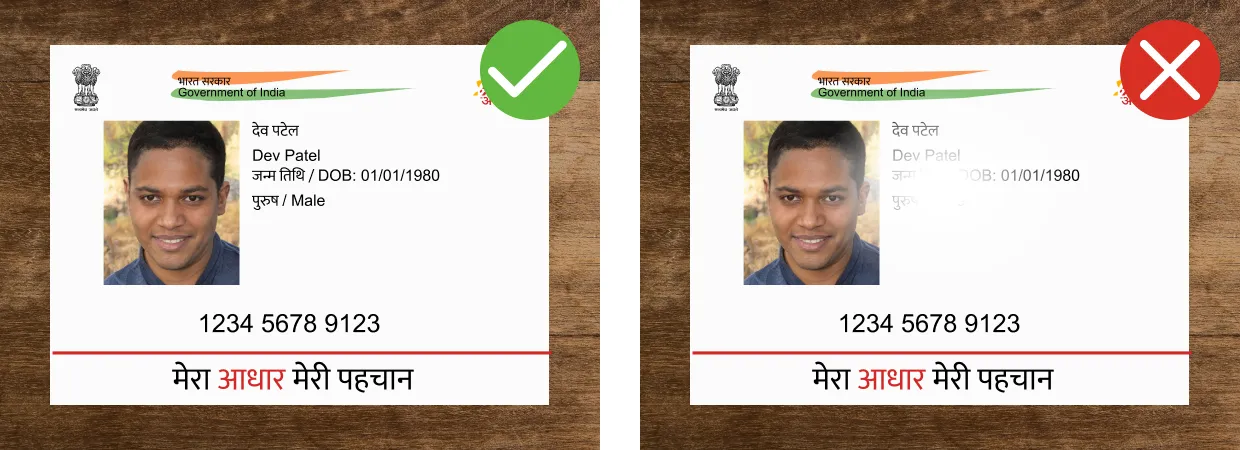
Avoid reflections
Glares and reflections interfere with processing and reduce data extraction accuracy. We recommend not to use the flash of your mobile device when capturing document images.
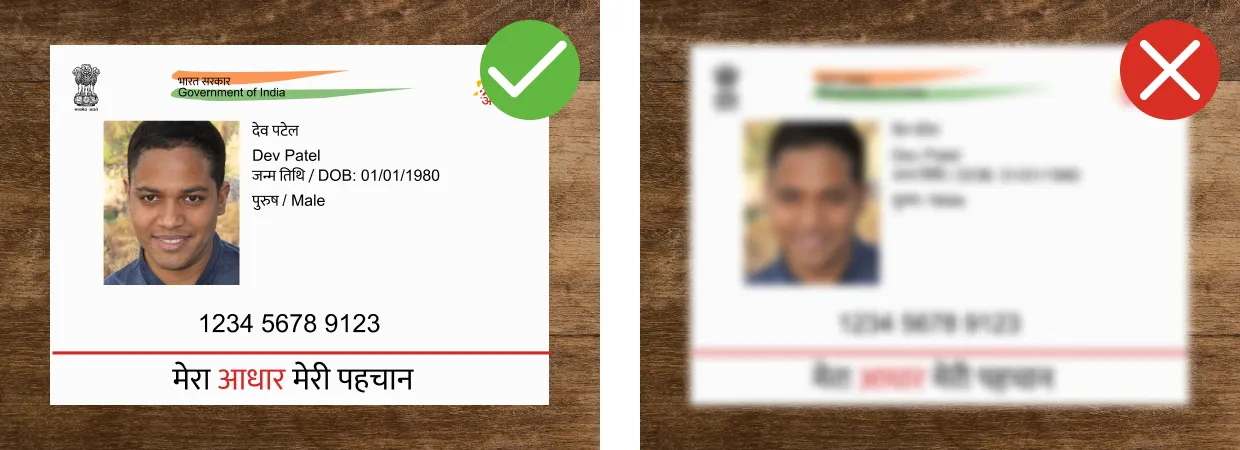
Focus and sharpness
Make sure the image is clear and there are no blurred areas.
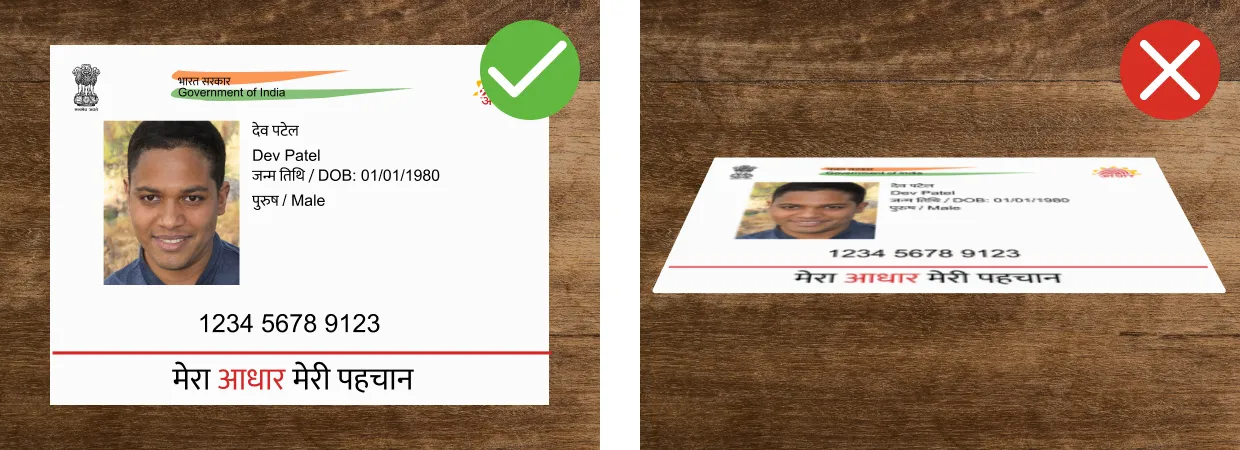
Angle
The tilt angle of the document should not exceed 10 degrees in any direction (horizontal or vertical).
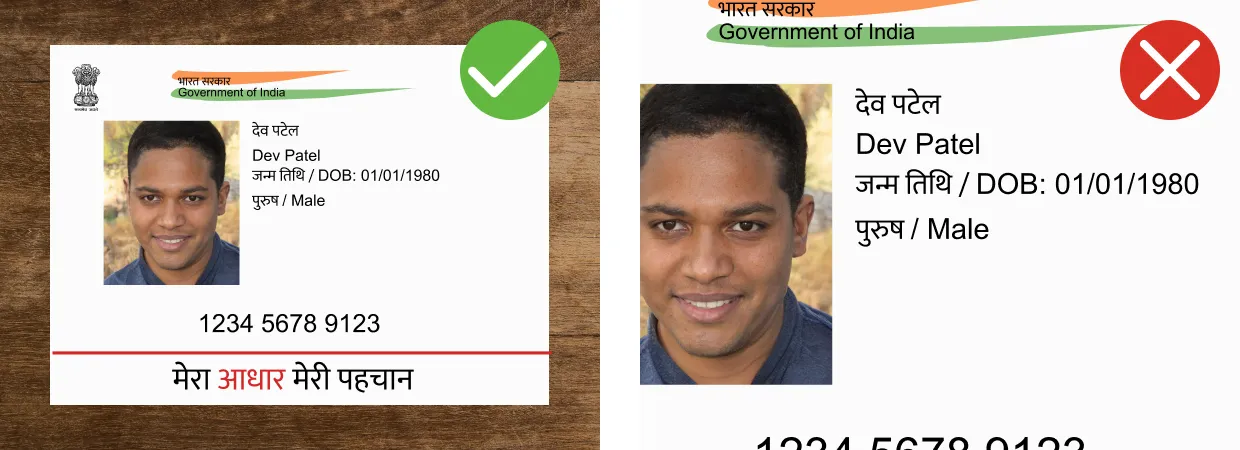
Margins (too small)
Make sure there is minimal space around the document. It is recommended that the document takes up 70-80% of the image.
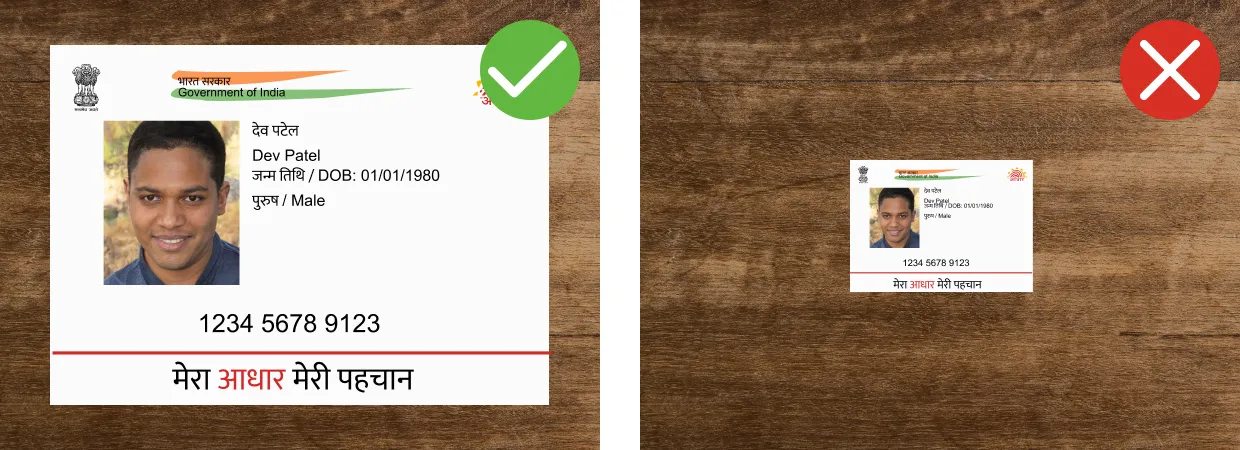
Margins (too big)
Make sure the space around the document does not take up more than 20-30% of the image. It is recommended that the document takes up 70-80% of the image.
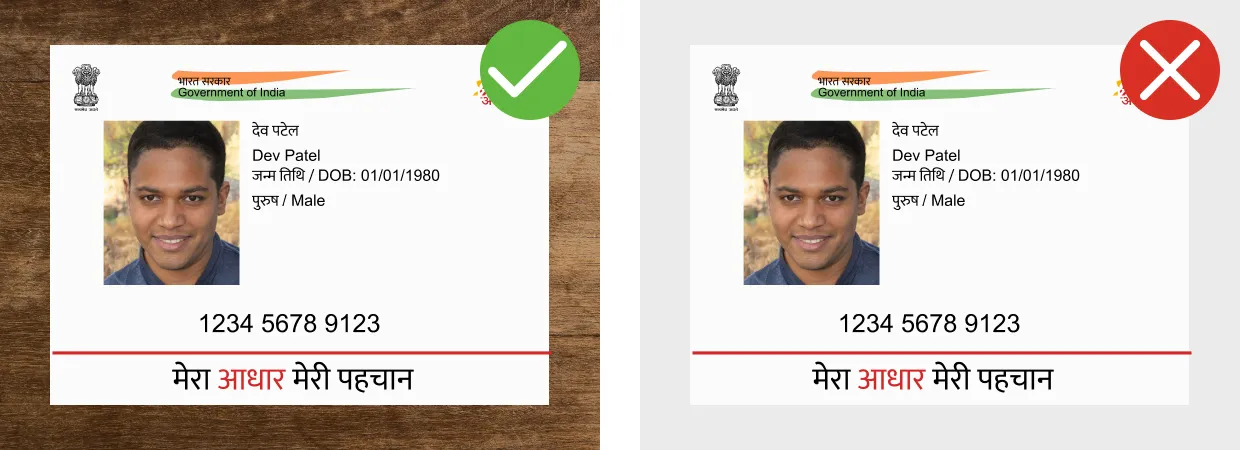
Contrast
The document should be in clear contrast to the background. A light-colored document on a light background, as well as a dark-colored document on a dark background, might not be recognized.
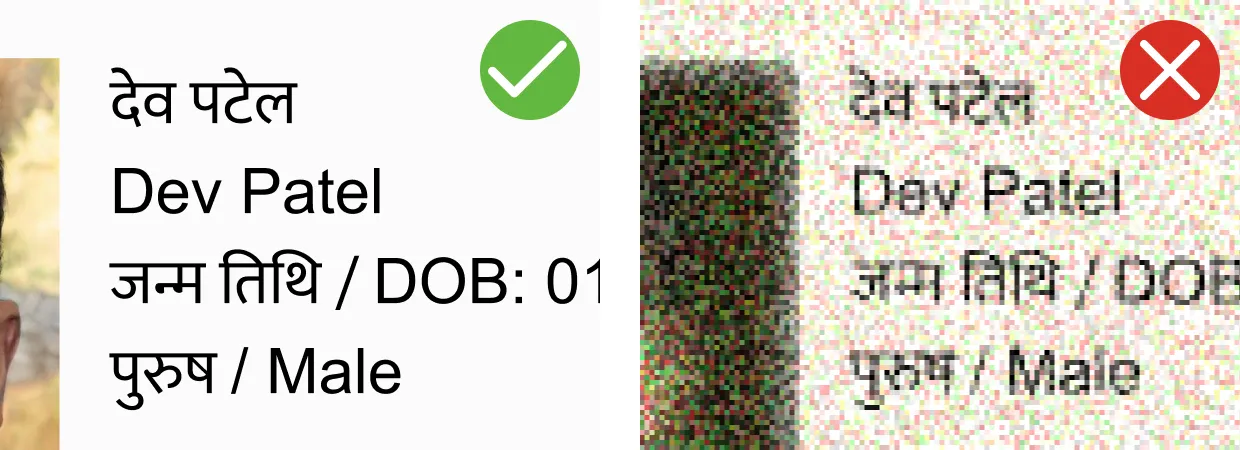
Resolution of the image
To achieve a good quality of recognition of identification documents, we recommend that you provide images captured by a camera with a resolution of at least Full HD (1920×1080) and autofocus.
Extraneous objects
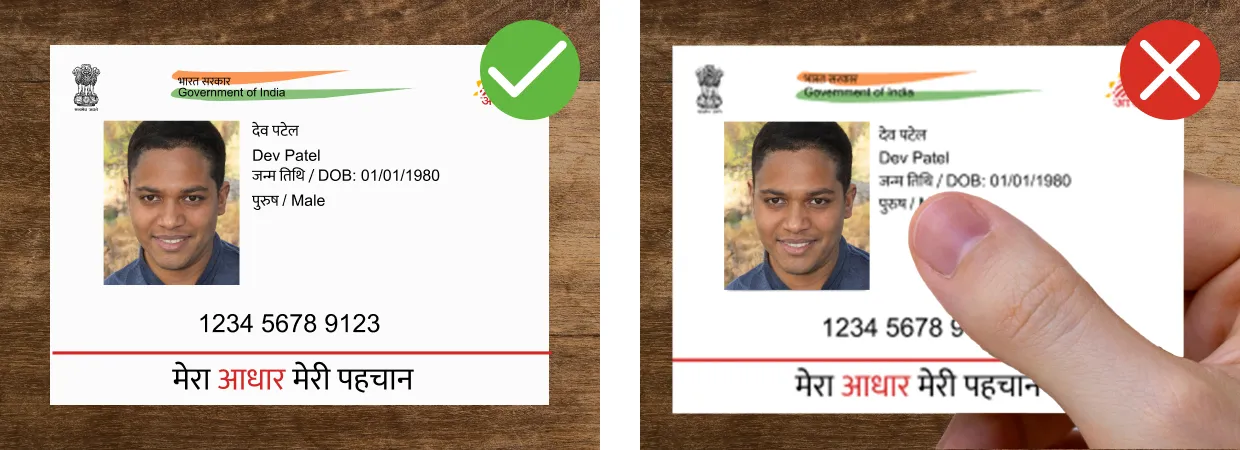
Make sure your hands or other objects do not cover document data.
Contact Us for Any Assistance
If you have any questions or need assistance, please reach out to our customer support team. You can contact us via email at [email protected]. We strive to provide prompt and reliable assistance, ensuring your queries are addressed effectively.
We value your feedback and are committed to making your experience smooth and enjoyable. Our team is dedicated to assisting you with any needs you may have. Thank you for choosing our services. We look forward to helping you!