Managing Encryption Keys
Overview
The Encryption Keys section under Security > Encryption Keys allows you to manage keys used for securing Studio API requests and responses (Requires admin access).
These keys are used by encryption plugins (symmetric and asymmetric) to ensure sensitive data is transmitted securely.
Centralized key management helps you:
- Easily configure encryption while creating Studio APIs
- Reuse keys across multiple APIs
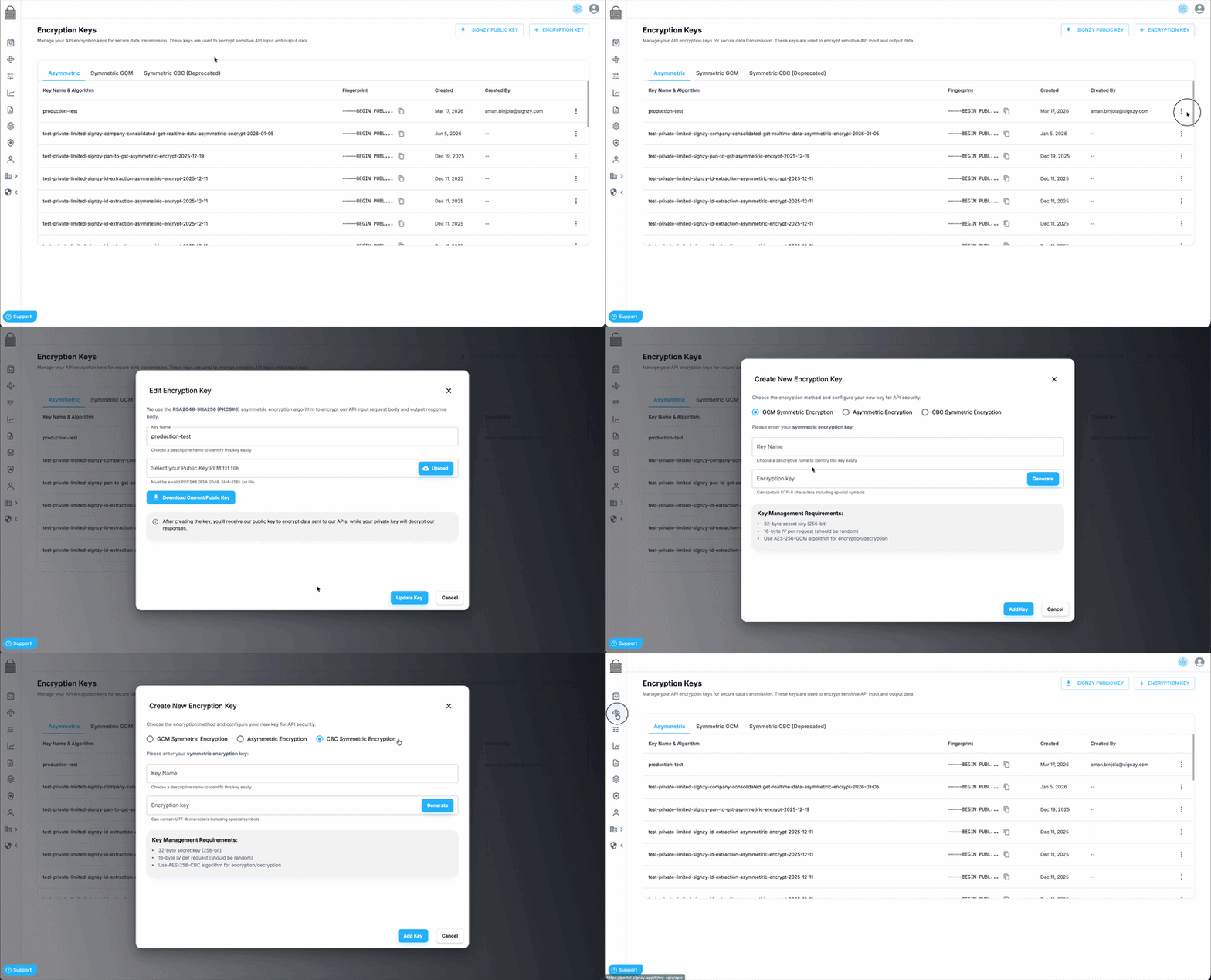
1. Accessing Encryption Keys
- Navigate to Security > Encryption Keys from the portal.
- View and manage all your configured encryption keys in one place.
- Download Signzy’s public key for asymmetric encryption.
- Add and manage your own keys for API usage.
2. Types of Keys
Symmetric Keys
- Used for AES256 encryption.
- Same key is used for both encryption and decryption.
- Requires:
- Secret key (32 bytes)
- Initialization Vector (IV)
Asymmetric Keys
- Used for RSA2048 encryption.
- Works as a key pair:
- Public Key → used for encryption
- Private Key → used for decryption
In this setup:
- Signzy provides its public key for encrypting requests.
- You upload or configure your public key so responses can be encrypted for you.
3. Managing Keys
Adding Keys
- Upload or generate your encryption keys in the Encryption Keys section.
- Assign a name or identifier for easy selection during API configuration.
Selecting Keys in Studio APIs
- While creating or editing a Studio API with encryption:
- Choose the encryption type (symmetric or asymmetric).
- Select the relevant key from a dropdown.
This removes the need to manually configure keys at the API level each time.
Rotating Keys
- Keys can be updated or rotated from the same section.
- Once updated, the key will reflect for all apis that was assigned automatically.
Why rotation matters:
- Improves security over time
- Reduces risk of key exposure
- Ensures compliance with security policies
4. How Keys Are Used in APIs
Symmetric Encryption Flow
- Select a symmetric key in Studio API.
- Use the same key to:
- Encrypt request before sending
- Decrypt response after receiving
Asymmetric Encryption Flow
- Download Signzy’s public key.
- Encrypt request using this public key.
- Upload or configure your public key in the portal.
- Signzy encrypts response using your public key.
- Decrypt response using your private key.
5. Use Cases
- Secure Data Transmission
Protect sensitive user data such as KYC details, documents, and identifiers.
- Compliance Requirements
Meet regulatory or enterprise security standards requiring encryption of data in transit.
- Multi-API Consistency
Use the same key across multiple Studio APIs for consistent security setup.
6. Best Practices
- Store private keys securely.
- Never expose private keys in client-side code or logs.
- Rotate keys periodically.
- Use asymmetric encryption when key sharing is not feasible.
- Use symmetric encryption for high-performance scenarios.