Input & Output Transformation
Overview
The Input/Output Transformation plugins reshape the request and response of a Studio API using JSONata expressions. You can send requests and receive responses in your own format, while the Base API in between stays unchanged.
Purpose:
- Input Transformation: Converts your request body into the format the Base API expects. You can rename, restructure, combine or drop fields.
- Output Transformation: Converts the Base API response into the format your system expects. You can pick, rename, flatten or derive fields.
Effect: The request you send and the response you receive can have a different structure from the Base API's. Only the fields defined in your expressions are passed on.
You can enable either plugin on its own, or both together.
How to Use
- Access API Studio
- Go to the My APIs page.
- Select the required API.
- Click Open API Studio. This opens the API Studio configuration page.
- Configure Transformation Plugins
- Provide a Studio API Name.
- Select the Base API and continue.
- Choose the environment (Test or Live).
- Enable Input Transformation, Output Transformation, or both.
- Write the JSONata expression for each enabled plugin in the editor:
- Input Transformation: The editor is pre-filled with the Base API's request fields. Replace each value with the path to the matching field in your request.
- Output Transformation: Each value is a path to a field in the Base API response.
- The editor checks your expression's syntax before it can be saved.
- Access Studio API
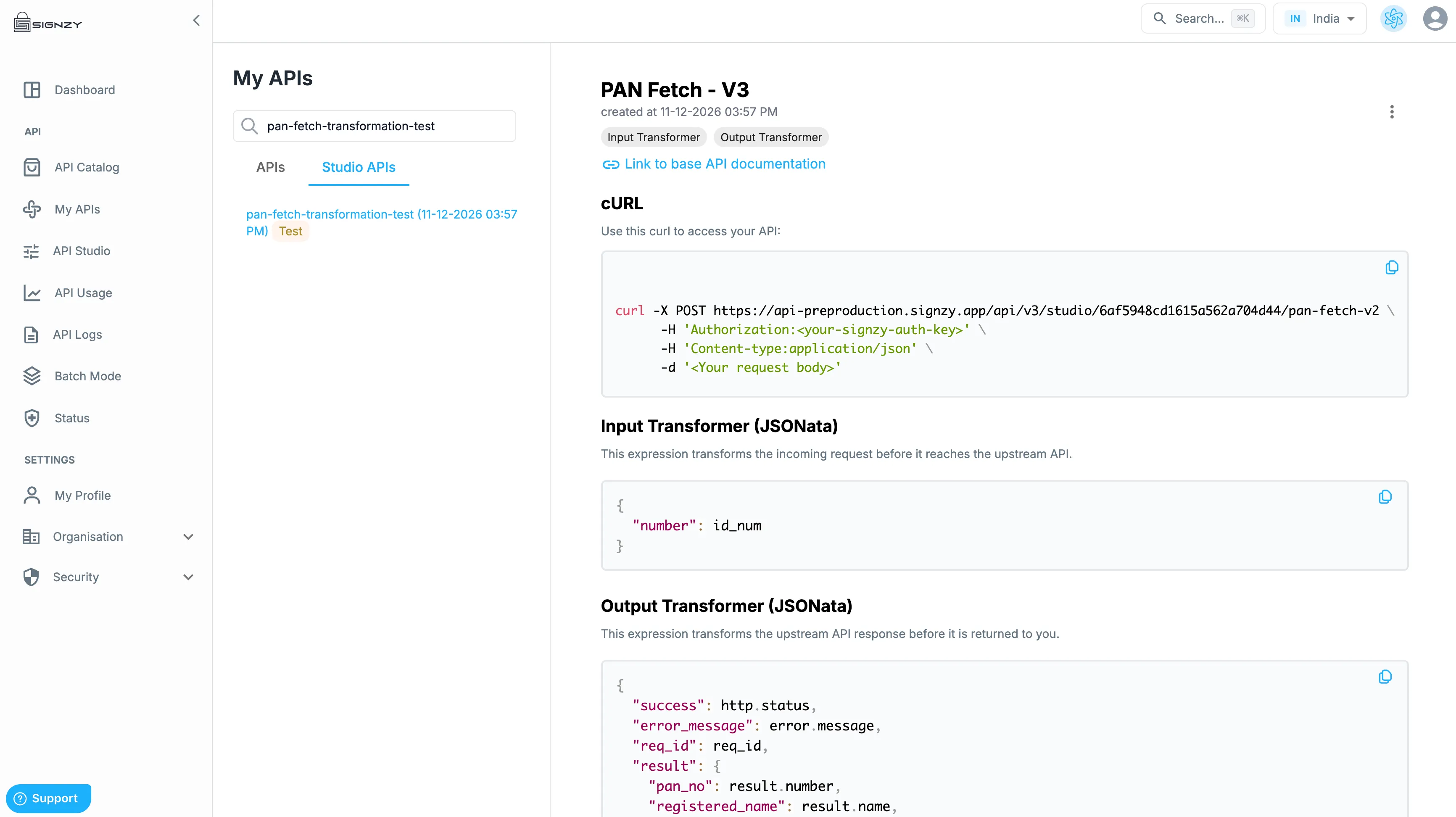
- Navigate to the Studio API tab under My APIs.
- Locate the newly created Transformation-enabled API.
- Use the API
- Refer to the plugin-specific documentation within the Studio API view.
- Send the request in your own format if Input Transformation is enabled. Otherwise, use the Base API's format.
- The response is returned in your own format if Output Transformation is enabled. Otherwise, it is the Base API response.
Writing the Expression
- Keys are the field names you want in the output.
- Values are field paths from the incoming JSON, written without quotes. For example, fieldA or parent.child.
- A value in quotes is sent as fixed text. For example, "FIXED_VALUE".
- If a referenced field is missing, it is left out of the output. It is not sent as null.
You write | Result |
|---|---|
"targetField": sourceField | targetField gets the value of sourceField |
"targetField": "sourceField" | targetField gets the literal text "sourceField" |
"targetField": parent.child | Reads a nested field |
"targetField": $uppercase(sourceField) | Converts the value to uppercase |
"targetField": fieldA & " " & fieldB | Joins two fields |
"targetField": $exists(sourceField) ? sourceField : "default" | Uses a default value if the field is missing |
Processing Order
When both transformations are enabled along with other plugins, the request is processed in this order:
- Decryption (if Encryption is enabled)
- Base64 Decode (if Base64 is enabled)
- Input Transformation
- Base API call
- Output Transformation
- Base64 Encode (if Base64 is enabled)
- Encryption (if Encryption is enabled)
Response Handling
- With Output Transformation, the response contains only the fields defined in your expression.
- Without Output Transformation, the Base API response is returned as is.
- If Base64 or Encryption is also enabled, the response is encoded or encrypted after the transformation.
Notes
- Field names are case-sensitive: fieldName and FieldName are different fields.
- The Input Transformation must produce every field the Base API requires. Otherwise the Base API rejects the request.
- Transformations always work on plain JSON. Decryption and decoding happen before the Input Transformation, and encoding and encryption happen after the Output Transformation.
- The Output Transformation also runs on Base API error responses. Reference fields that exist in both success and error responses, or use $exists(), so that error details are not lost.
- You can test expressions on sample data at https://try.jsonata.org.
Example Request
{
  "referenceId": "REF-001",
  "customer": {
    "firstName": "John",
    "lastName": "Doe"
  },
  "docNumber": "XYZ123"
}
Input Transformation
{
  "name": customer.firstName & " " & customer.lastName,
  "number": docNumber
}
Sent to the Base API
{
  "name": "John Doe",
  "number": "XYZ123"
}
referenceId is not used in the expression, so it is not sent to the Base API.
Example Response
Base API response
{
  "result": {
    "field1": "value1",
    "field2": "value2",
    "field3": "value3"
  }
}
Output Transformation
{
  "outputA": result.field1,
  "outputB": result.field2
}
Returned to you
{
  "outputA": "value1",
  "outputB": "value2"
}
field3 is not used in the expression, so it is not returned.
When to Use
- Use Input Transformation when your system already sends requests in a fixed format and you don't want to change it to match the Base API.
- Use Output Transformation when your system expects a fixed response format, or needs only a few fields from a large Base API response.
- Use both to connect an existing integration to a Signzy API without changing any request or response handling on your side.
Transformation API Example
curl -X POST https://<endpoint>/api/v3/studio/<id>/<base-api-id> \
  -H 'Authorization:<your-signzy-auth-key>' \
  -H 'Content-type:application/json' \
  -d '<Request body in your own format>'