Procure Estamp
Introduction
Procure Estamp API can be used by support staff of signzy to procure the estamps for the customers. This API takes in the below mentioned input and returns the orderId as a response.
Once this API has been hit, the vendor will be sent a mail in which he receives all the requested data to generate an estamp and a link to download the csv template along a link to upload the estamps that he generates.
Email flow for the vendor
Once the API has been hit, the vendor receives an email as shown below. The email consists of the data that is required to generate estamps.
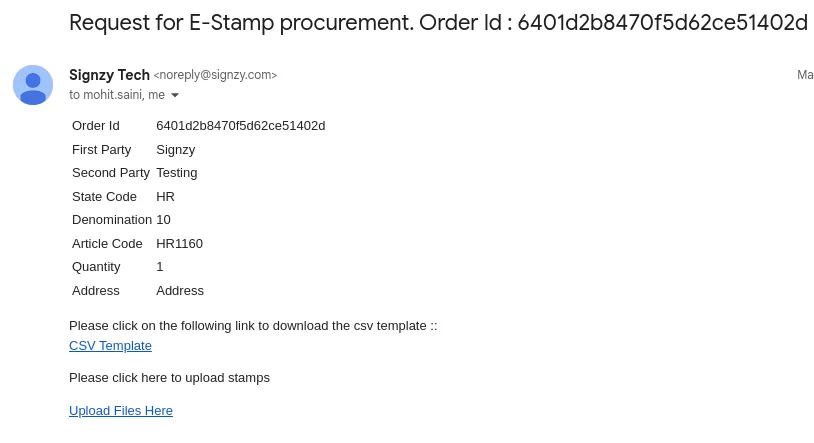
Vendor also receives a link to download a CSV template in which sNo, clientCode, firstParty, secondParty, stateCode, denomination, articleCode fields are prefilled based on the request.
Vendor needs to fill in stampType, pgNo, certificateNo, certificateDate, uniqueDocumentReference fields after they generate the estamps.
Sample CSV Template
The number of rows in the csv file would be equal to the number of estamps requested by a client
sNo | clientCode | firstParty | secondParty | stateCode | denomination | articleCode | stampType | pgNo | certifitcateNo | certificateDate | uniqueDocumentReference |
|---|---|---|---|---|---|---|---|---|---|---|---|
1 | 617a77750cd3f40a5205e593 | Signzy | Testing | HR | 10 | HR1160 | | | | | |
CSV Template Parameters
Below are the fields that the vendor needs to fill in before he uploads the csv file.
PARAMETER NAME | DESCRIPTION |
|---|---|
stampType | This field refers to the type of estamp or seal that was used to authenticate the document. |
pgNo | It holds the reference to a particular estamp in the estamp pdf file that vendor uploads estamps. |
certificateNo | This field typically contains a unique identifier for the estamp or seal. |
certificateDate | This field contains the date on which the estamp was created. |
uniqueDocumentReference | This field typically contains a unique identifier for the document itself. |
Upload files
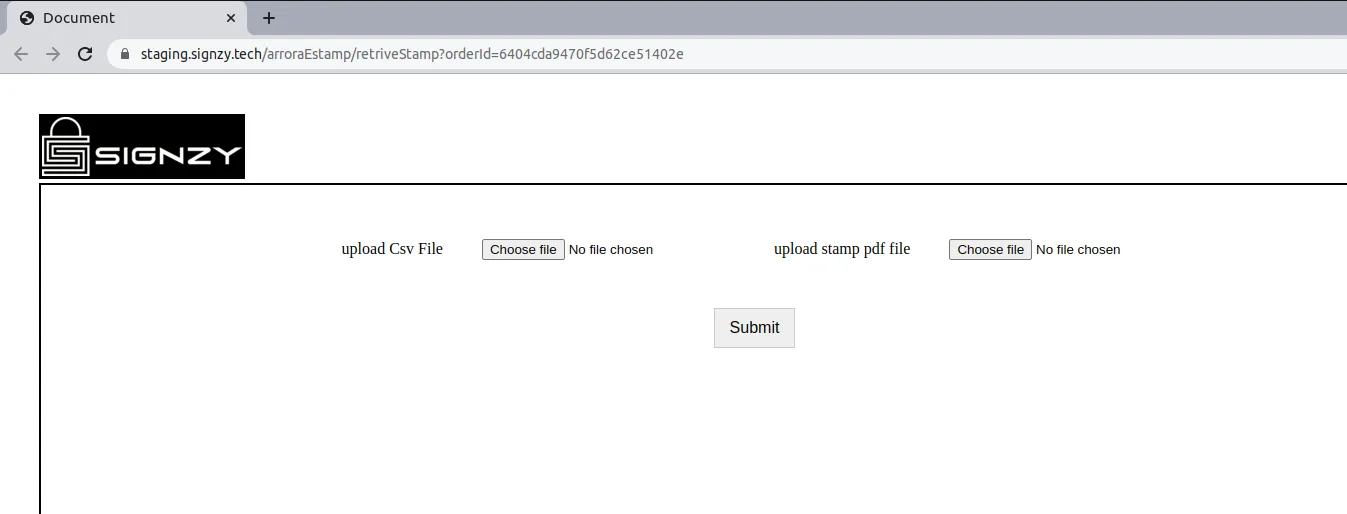
The vendor also receives a link where he can upload the estamp pdf file and the csv template after succesfully filling in all the details. Estamp pdf file should contain all the estamps that are requested.
And once the vendor submits both the files, the requested estamps are succesfully procured.
How to call the API
You will need to log in before sending the request. You are required to pass the access token received from the login call, as the authorization header in the request.
API Input Guidelines
Make sure you replace ..your-patron-id.. in the URL with the patronId that you receive from the login call and also make sure you pass in all the necessary input parameters in the correct format.
Sample Curl
curl --location --request POST 'https://preproduction.signzy.tech/api/v2/patrons/..your-patron-id../estamping' \
--header 'Authorization: <Auth Key>' \
--header 'Content-Type: application/json' \
--data-raw '{
        "task": "procureStamp",
        "essentials": {
            "patronId" : "...patron id..."
            "consumerName": "...consumerName..."(optional),
            "firstParty": "...firstParty...",
            "secondParty": "...secondParty...",
            "stateCode": "...stateCode...",
            "denomination": denomination,
            "articleCode": "articleCode...",
            "qty": qty,
            "address": "...address...",
            "supportEmail": ["...supportEmail..."]
        }
    }'
Input Parameters
PARAMETERS | DESCRIPTION | TYPE | VALUE (COMPULSORY OR OPTIONAL) |
|---|---|---|---|
patronId | your patronId | string | Mandatory |
consumerName | name of the consumer | string | Optional |
firstParty | name of first party involved in the transaction | string | Mandatory |
secondParty | name of second party involved in the transaction | string | Mandatory |
stateCode | state code of the states where estamps are valid. Possible values : ["KA", "MH", "GJ", "AP", "AN", "AS", "BR", "CT", "CH", "DN", "DD", "DL", "HP", "JK", "JH", "LA", "OR", "PY", "RJ", "TN", "TR", "UP", "UT", "PB", "WB", "GA", "HR", "KL", "MN", "ML", "MZ", "NL", "LD", "SK", "AR", "TG", "MP"] | string | Mandatory |
denomination | denomination of the estamp : Rs. 5, Rs. 10, Rs. 20, Rs. 50, Rs. 100, Rs. 500, Rs. 1000 etc depending on the applicable stamp duty for the transaction | number | Mandatory |
articleCode | e-stamping article code : It is a unique code which differs for every state based on the type of the transaction that you are involved in | string | Mandatory |
qty | Quantity of the estamps that you want to procure | Number | Mandatory |
address | address | string | Mandatory |
supportEmail | emails of support staff of signzy | array | Mandatory |
Valid State and State Codes
STATE | STATECODE |
|---|---|
Karnataka | KA |
Maharastra | MH |
Gujarat | GJ |
Andhra Pradesh | AP |
Andaman and NIcobar Islands | AN |
Assam | AS |
Bihar | BR |
Chhattisgarh | CT |
Chandigarh | CH |
Dadra and Nagar Haveli | DN |
Daman and Diu | DD |
Delhi | DL |
Himachal Pradesh | HP |
Jammu and Kashmir | JK |
Jharkhand | JH |
Ladakh | LA |
Orissa | OR |
Pondicherry | PY |
Rajasthan | RJ |
Tamil Nadu | TN |
Tripura | TR |
Uttar Pradesh | UP |
Uttarakhand | UT |
Punjab | PB |
West Bengal | WB |
Goa | GA |
Haryana | HR |
Kerala | KL |
Manipur | MN |
Meghalaya | ML |
Mizoram | MZ |
Nagaland | NL |
Lakshadweep | LD |
Sikkim | SK |
Arunachal Pradesh | AR |
Telangana | TG |
Madhya Pradesh | MP |
Article Codes
You can download the below csv file to check all possible article codes which varies from state to state and depend on the transaction that you are involved in.
Sample CSV format
name | isActive | articleCode | stateCode |
|---|---|---|---|
Acknowledgement [1] | 0 | KA1001 | KA |
Administration Bond [2] | 0 | KA1002 | KA |
Adoption Deed [3] | 0 | KA1003 | KA |
Affidavit [4] | 1 | KA1004 | KA |
In order to find the exact article code, one needs to check the corresponding stateCode and then look into the name column to identify the type of transaction for which one needs to generate an estamp.
Sample Response
{
        "result": {
            "orderId": ["...orderId..."]
        }
    }
Response Parameter
PARAMETER NAME | DESCRIPTION |
|---|---|
orderId | order id is a reference to track the estamp order with vendor |
Sample Error
{
    "error": {
        "name": "error",
        "message": "Internal Server Error",
        "status": 500,
        "statusCode": 500
    }
}
Error Parameter
PARAMETER NAME | DESCRIPTION |
|---|---|
error | This parameter contains the error. |
error.name | the name of the error |
error.message | the error message |
error.status | status of the api |
error.statusCode | Request Status code from Signzy |
Error Codes
CODE | DESCRIPTION | INTERPRETATION |
|---|---|---|
400 | Bad Request | Input Parameter has a missing required parameter or not a valid one |
401 | Authorization Failed | Authorization token is invalid. |
500 | Internal Server Error | Internal error at Signzy, please contact support. |
Getting help
Please feel free to contact us if you have any questions, require clarification, or have ideas for how to make the documents or any of our services better.
You can reach out to us at [email protected].