Basic Info
Contracting Workflow
Product flow:
Contract:
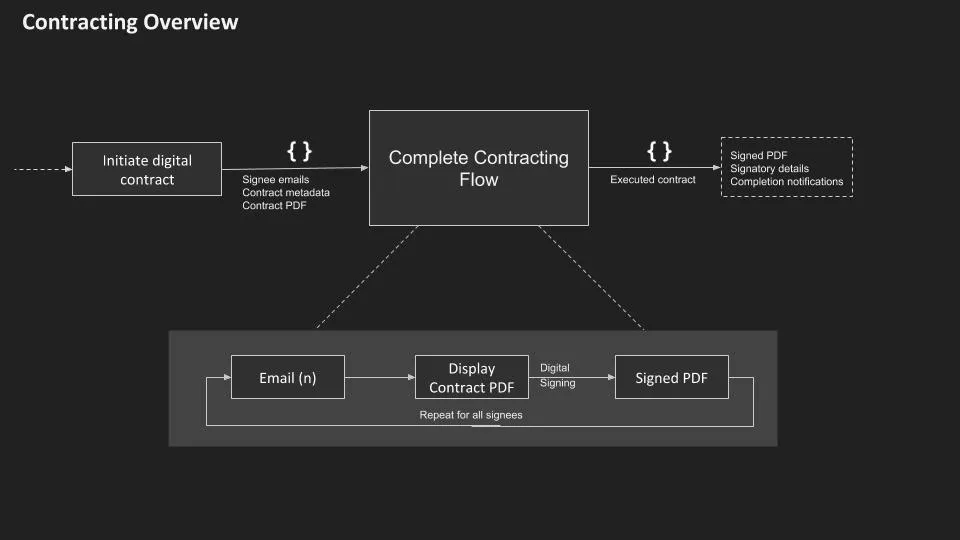
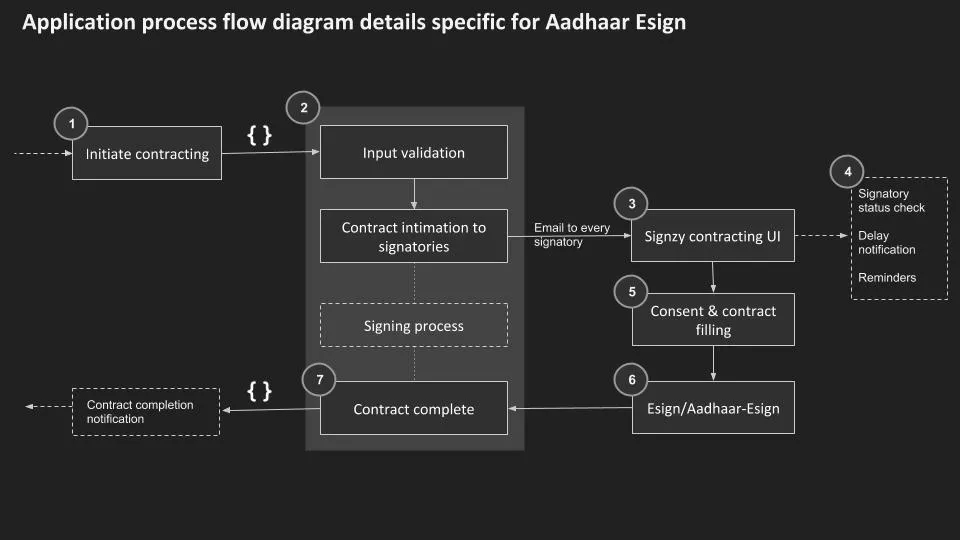
A contract is created at the client end and the PDF for contract is passed into Signzy Contracting system. Signzy system responds with a URL for each of the signatories. These contract URLs are in turn provided to end customers where they can fill their signature and execute contract. The end product of Signzy Contracting System is a signed PDF with all necessary metadata and audit trail.
The process flow:
- Client first hits Create contract API with the contract as PDF File.
- The PDF can be provided as a URL or base64
- Other details provided to this endpoint is the signatory details.
- Contract process starts after the above API call is made.
- The first signer gets a unique URL over his email for signing the contract where he can apply his signature and execute.
- Once the first signatory has executed the next signatory receives his direct URL for signing.
- This process continues till all the signatories have signed.
- Once all the signatories have signed, the contract is said to be executed and signed contract PDF is posted to the callback URL (callback URL is provided in the contract creation request). This step marks end of contracting flow.
- Client can avail the contract along with its metadata using the pull contract API call by passing contactId and customerId parameters
- Client can choose to delete the contract from Signzy system once the contract is executed and its availability is not needed in Signzy system. Parameters contractId and customerId are passed mandatorily for the contract to be deleted.
- Client can choose to delete a particular signer from a particular contract created earlier in the Signzy system. Parameters contractId ,customerId and signerEmail are passed mandatorily to identify the particular signer of the contract that is to be be deleted.
- The contract gets completed automatically once all the signers have signed the contract, however, the client can use the completeContract API to complete the contract at any given time. In sequential signing atleast one signer must have completed the signing process.
Parallel eSign
By default, the signing flow for all the signers will be sequential i.e 2nd signer will get signing URL only after 1st signer completes signing and so on. But if someones doesn't want it to be sequential, they can choose Parallel eSign during contract creation time.
- All the signers will receive their respective unique URLs for signing the contracts over their emails at the same time.
- But only one user will be able to open the signing URL at a given point of time. The signer who opens the URL first will be given the preference.
- Each signer will be given a timer once they open the signing URL and if any other user tries to open their corresponding URL at the same time, they will get a popup saying one user is currently signing the document and please try again after x(remaining time based on the timer for the current signer who is signing the document) minutes.
- A signer can be an optional/mandatory signer. If a particular signer is not marked as an optional signer then he is considered as a mandatory signer.
- Once all the mandatory signatories have signed the contract is said to be executed and the signed contract PDF is posted to the callback URL (callback URL is provided in the contract creation request). This step marks the end of contracting flow.
- The contract gets completed automatically once all the mandatory signers have signed it, however, the client can use the completeContract API to complete the contract at any point of time. In parallel signing atleast one of the mandatory signers must have signed the contract completely.
To see the exact details of each API endpoint and exact API request and response parameters, please refer the endpoint docs.
Customer Login
Authentication
Authorizing your access
Username and API key also acts like your key to the APIs. You need to have an access token for making any further API calls, which you can receive by logging in manually or programmatically using these credentials.
Signzy APIs adhere to authentication defined by Swagger 2.0 specifications. Each call to the APIs should include an 'Authorization' header or 'access_token' query parameter for authentication.
You can find working examples at the bottom of this page.
Logging in
Logging in into the API services requires a simple HTTP call with authentication password. Following section mentions data to be input, expected output and meaning of fields.
curl --location --request POST 'https://contracting-preproduction.signzy.tech/api/customers/login' \
--data-raw '{
     "username": "enter your valid username",
     "password": "enter your valid password"
}'Sending Authenticated Requests
Once you have an access token from the login API call, you can send further calls to different endpoints by passing the access-token in Authorization header or in access_token query (GET) parameter.
It is advisable to send Access Token in header since, query parameters are sometimes saved in the log files thereby exposing vulnerabilities until the access_token is deleted from sessions.
Security
Anybody with your API key/password or an Access Token generated using them can access all information you have created and also send requests on behalf of you.. It is strongly recommended to not send API-key/Password to client side and instead use reverse proxy to call Signzy APIs.
In case you think an access token is compromised, you should delete it using logout. Please inform us if your Signzy Password/API-key is compromised as soon as possible, so that we can disable & create new ones and prevent any misuse of your data.
Logging out
To logout you simply need to call the logout route with the access token in 'access_token' query parameter or as 'Authorization' header.
https://contracting-preproduction.signzy.tech/api/customers/logout?access_token=...accessToken...
Response is 204 status code with no content, indicating the Access-token has been deleted