Face Match API
Face Match
You will need to login before sending request. You are required to pass the access token received from the login call, as authorization header in the Face Match request along with essentials.
Face match API is used to ensure that two images belong to same person/individual. In this we need to either upload two images or give URLs of two images to match ,as input to the API.
You can also provide a optional threshold value between 0.05-0.95 to decide which match is False or True. If match percentage is greater than or equal to threshold then True otherwise False.
Recommended Threshold value for Face Match API
Highlighted part of table shows the threshold at which Precision is high and recall is acceptably low. we recommend to use this threshold (ie. 40) for best user experience. The optimum range of threshold should lie between 35-40. Higher thresholds might increase the precision in the results but decrease the recall i.e. pass rate will decrease.
The below table can help make a decision on the acceptance rate.
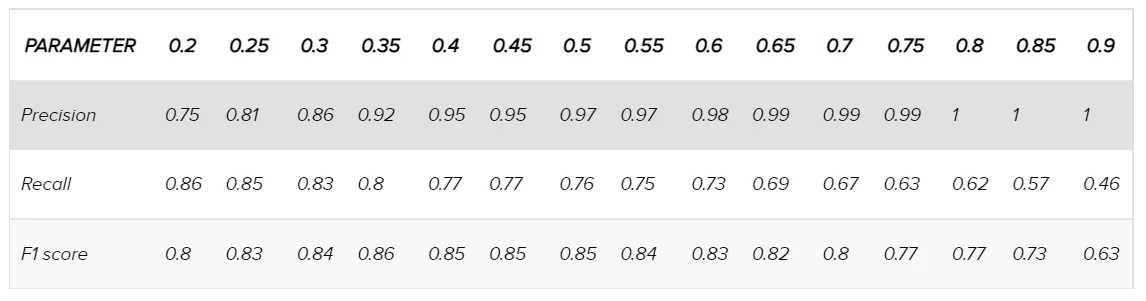
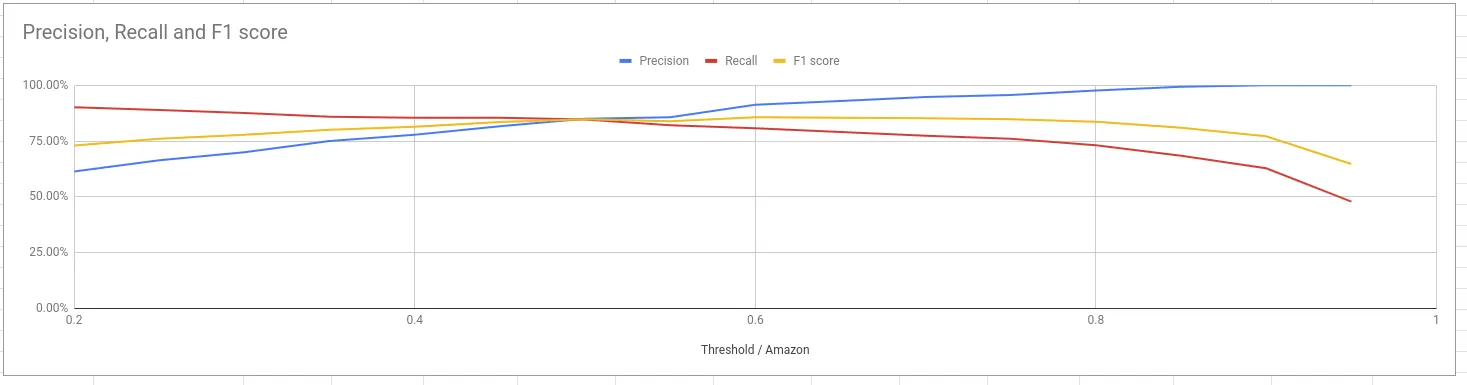
- Precision Rate: Measures ability of the system to classify correctly out of the total successfully classified.
- Recall: Measures ability of the system to classify the input data.
- F1 Score: This is the Geometric mean of the Precision rate and Recall rate.
You can also align the image horizontally before face match by setting the value of align Horizontally parameter to 'yes', by default it is 'no'. This is an optional parameter. This operation may increase the response time of the API and will be additionally charged. To use this feature please make sure you have access to reorient API.
It compares two images and gives the ratio of matching between them and match Percentage between them.
In response, it gives three things as mentioned below
- Verified true or false.
- A message that says whether the verification completed with positive result or negative result.
- A match Percentage to signify the percentage of match between the two given images.
Supported file formats are jpeg, jpg, png only.
curl --location --request POST 'https://signzy.tech/api/v2/patrons/..patronId../facematches' \

--header 'Authorization: <token>' \
--header 'content-type: application/json' \
--data-raw '{
    "essentials": {
        "firstImage": "...firstImage..",
        "secondImage": "...secondImage...",
        "threshold": "Contains the threshold value between 0.05 to 0.95",
        "alignHorizontally" : "yes/no"
    }
}'Request Schema
curl --location --request POST 'https://preproduction.signzy.tech/api/v2/patrons/..patronId../facematches' \
--header 'Accept: */*' \
--header 'Accept-Language: en-US,en;q=0.8' \
--header 'Authorization: <token>' \
--header 'content-type: application/json' \
--data-raw '{
    "essentials": {
            "firstImage": ".....first image URL....",
             "secondImage": ".....Second image URL....",
             "threshold":"...value between 0.05 to 0.95...(optional)",
             "alignHorizontally":"yes|no....(optional)"
    }
}'
Parameters
Parameters | Data Type | Description |
|---|---|---|
essentials | string | Contains the essential input data |
essentials.firstImage | string | Contains the URL of the first image |
essentials.secondImage | string | Contains the URL of the second image |
essentials.threshold | string | Contains the threshold value between 0.05 to 0.95 |
essentials.alignHorizontally | string | Returns true/false |
Response
{
           "essentials": {
             "firstImage": ".....first image URL....",
             "secondImage": ".....Second image URL...."
           },
           "id": "......id.....",
           "patronId": "..patronID....",
           "result": {
             "verified": "...verified 'true' or 'false'.....",
             "message": ".....message.....",
             "matchPercentage": ".....match %...."
           }
         }
Response Parameter
PARAMETER NAME | DESCRIPTION |
|---|---|
essentials | Contains the essential input data. |
essentials.firstImage | The URL of the first image for comparison, |
essentials.secondImage | The URL of the second image for comparison, |
essentials.id | This parameter contains the unique Id received from the identity request. |
essentials.patronId | This parameter returns the unique ID of the UEN holder. |
result | This holds final result of the response. |
result.verified | This parameter displays whether the verification done is true/false. |
result.message | The message is displayed to the user regarding the status of the verification. |
result.matchPercentage | This parameter displays the match percentage between the two uploaded images. |
Getting help
Please feel free to contact us if you have any questions, require clarification, or have ideas for how to make the documents or any of our services better.
You can reach out to us at [email protected].